Keybinds not working
This guide addresses issues where keybinds aren't functioning in SmoredBoard.
Three Primary Causes
1. Disabled Toggle Setting
The keybind feature may be accidentally turned off in settings. Verify the toggle is switched "on" to restore functionality.
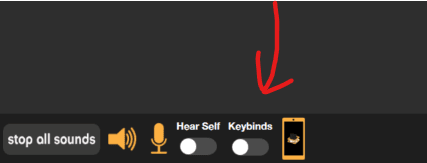
2. App Running at Higher Privilege Level
If your game or application is running as Administrator but SmoredBoard is not, keybinds will not work. Windows prevents non-elevated apps from detecting keyboard input in elevated windows.
Solution: Run SmoredBoard as Administrator to match the privilege level of your game or app.
Note: In version 1.0.3.5 and older, running as Administrator will prevent you from dragging and dropping sounds into the SmoredBoard. See Cannot Drag and Drop Sounds for workarounds.
3. Antivirus/Anti-Cheat Interference
Security software or game anti-cheat systems can block the application from detecting keyboard input.
Solution
To resolve keybind issues:
- 1. Close SmoredBoard entirely
- 2. Right-click the SmoredBoard application icon
- 3. Select "Run as Administrator"
This elevated access allows the app to properly detect and process keybinds by granting necessary system permissions.
Need help setting up keybinds? Check out our How To Use Keybinds tutorial.
Still having issues? Contact Support